Check whether a phone, cellular tablet, or smartwatch has eSIM hardware and whether its purchase-market variant is ready for a travel eSIM. Select the exact model and country or territory of purchase; uncertain results stay uncertain instead of being guessed.
Important: Hardware support does not guarantee that a travel eSIM will activate. The device may still be carrier-locked, restricted by firmware, or incompatible with a particular provider. Never post a complete IMEI or EID on a public website.
How the eSIM compatibility checker works
The result is built in layers. First, the checker evaluates the selected hardware. It then applies the country or territory where that device was purchased, any known regional SIM configuration, and the carrier-lock status you report. Watches are handled separately because most cellular watches require a domestic carrier wearable plan rather than an ordinary phone travel eSIM.
Why country of purchase matters
Two devices with the same marketing name can use different SIM configurations. Some iPhones are eSIM-only in selected markets, some older China-mainland variants omit eSIM, and Android manufacturers may change eSIM availability by model number, carrier, firmware, or country. That is why this checker uses named markets instead of broad answers such as “Latin America” or “Asia-Pacific.”
Phone, tablet and smartwatch results are different
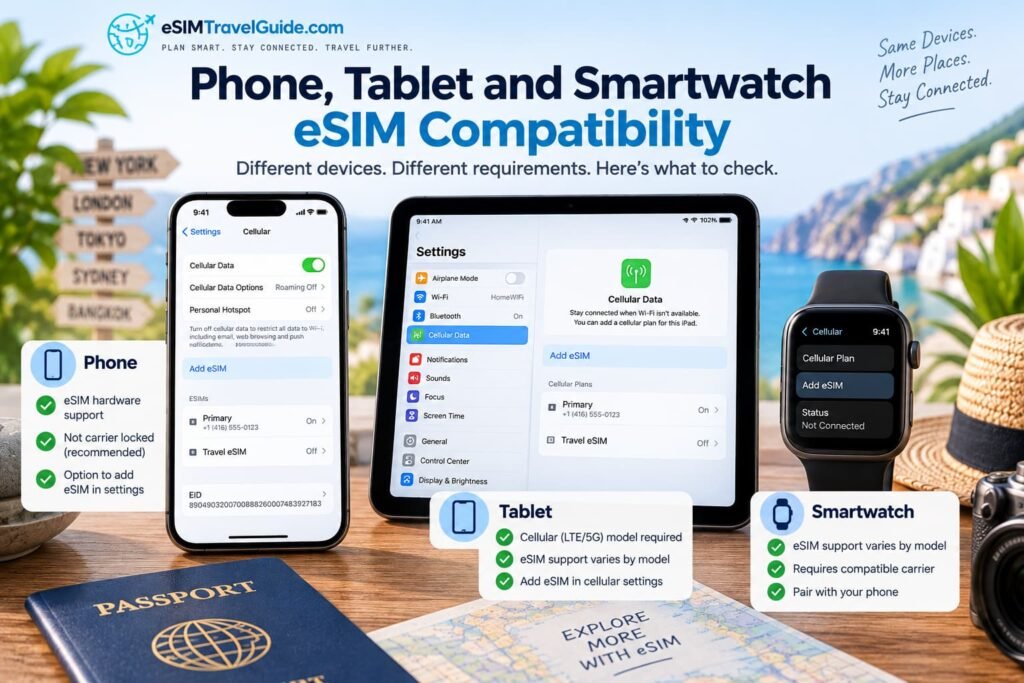
A phone with eSIM hardware may accept an independent travel eSIM when it is unlocked. A tablet must be the cellular or 5G version; a Wi-Fi-only tablet has no cellular modem. A cellular smartwatch may contain an eSIM but generally depends on a supported carrier wearable plan, so the checker does not describe it as ordinary travel-eSIM compatibility.
How to confirm eSIM support on the device
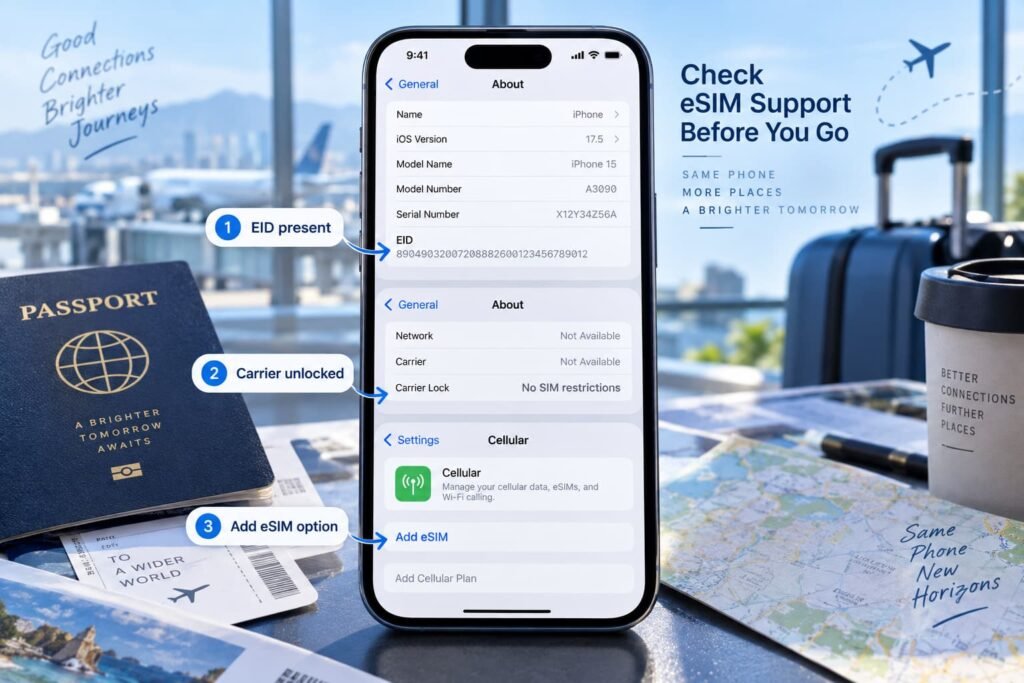
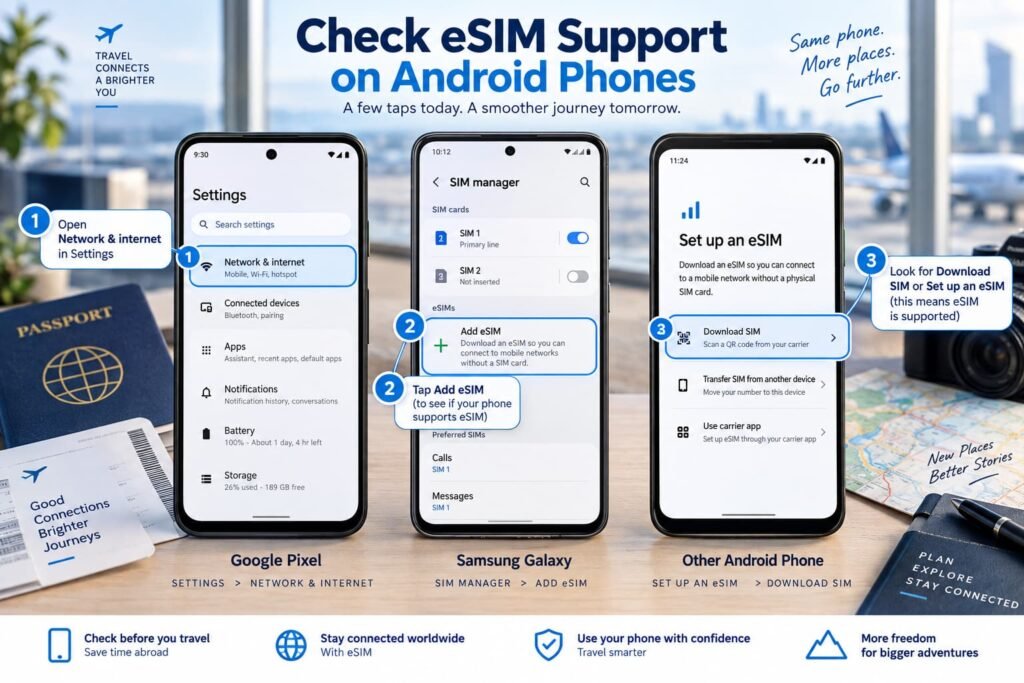
On an iPhone or cellular iPad, look in Settings for an EID and an Add eSIM or Add Cellular Plan option. On Android, check About phone or SIM Manager for an EID and Add eSIM. The presence of an EID is a strong hardware signal, but you should still confirm carrier locking and the travel provider’s destination coverage before paying.
Frequently asked questions about the checker
Does this website scan my phone?
No. Detection only suggests an Android model when the browser exposes it. The checker does not access cellular settings and does not request or store an IMEI or EID.
Why must I select where the device was purchased?
The purchase market can determine the hardware variant, SIM configuration, carrier firmware, and whether eSIM is enabled. Your current location or travel destination does not identify the model that was originally sold.
Can a compatible phone still reject a travel eSIM?
Yes. Carrier locking, provider activation policy, destination coverage, firmware, and an incorrect regional variant can still prevent activation.
Why does a result say “verify exact variant”?
That means authoritative information varies by model number, country, carrier, or software version, or the available evidence is not specific enough for a definitive answer. It does not mean the device is unsupported.
Are cellular watches compatible with travel eSIMs?
Most are not compatible in the same way as phones. They usually require a wearable plan from a supported mobile carrier and may need to share service with a companion phone.
What are the checker’s limitations?
It cannot remotely inspect an EID, model number, carrier lock, firmware, or provider account. Manufacturer and carrier documentation remains authoritative, and the final confirmation must be made in the device settings.
Compatibility methodology
Definitive results require manufacturer or carrier evidence for the selected model or family. Regional conflicts produce a conditional or unknown result rather than an unsupported result. New launches enter the checker only after their official product name and SIM configuration can be verified. Device records and source links are reviewed regularly, with high-interest launches prioritized.
Compatibility database reviewed: September 14, 2026. Country and territory selector: 249 ISO 3166-1 entries. Device, carrier, firmware, and market support can change.
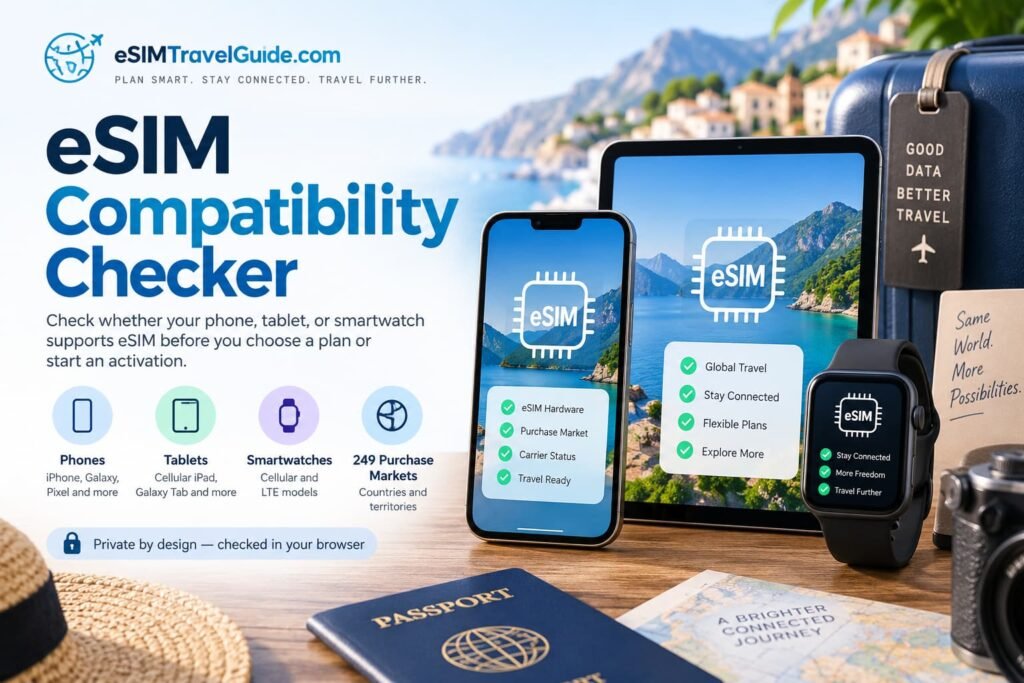
What an eSIM-Compatible Result Actually Means
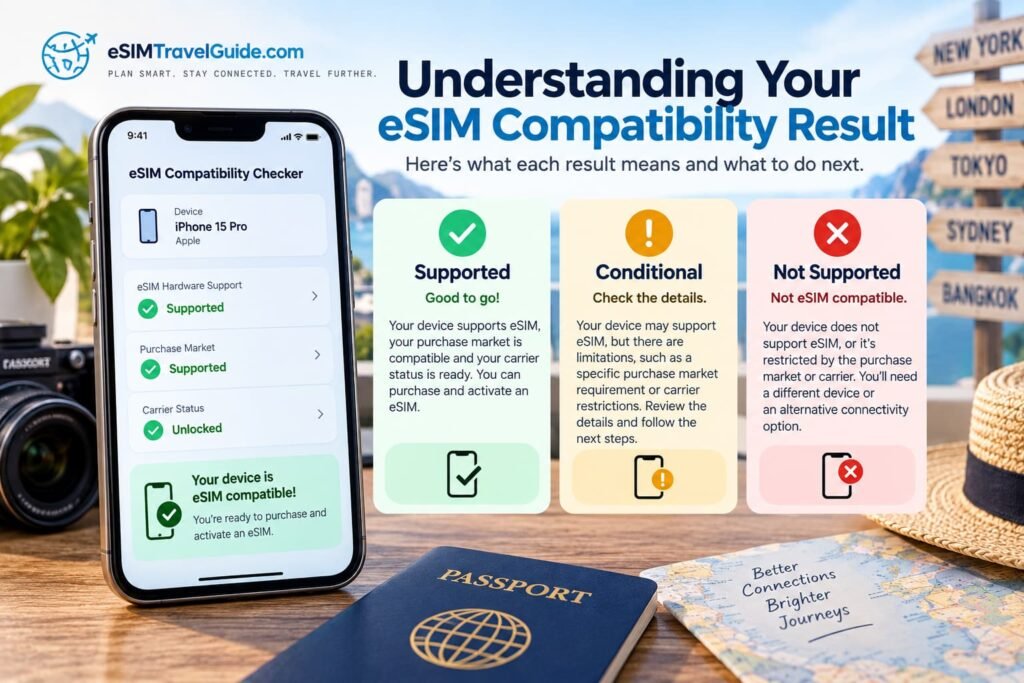
Getting a compatible result is an important first step, but it does not automatically mean that every travel eSIM will work on that device.
There are several separate pieces that need to line up.
First, the phone or tablet needs the hardware and software required to store an eSIM profile. Second, the exact regional version of the device needs to have eSIM enabled. Third, a phone must normally be carrier-unlocked before it can accept a travel eSIM from another provider.
The travel plan itself also needs to support your destination and the device you intend to use.
This is why I separate eSIM hardware compatibility from travel eSIM readiness.
A phone can pass the hardware check and still fail later because of a carrier lock, regional restriction, provider requirement, or unsupported network configuration.
How to Read a Conditional Result
A result such as Verify exact regional variant does not mean the phone is incompatible.
It means the model name alone is not enough to give a dependable answer.
This commonly happens when a manufacturer sells several versions of the same phone under one marketing name. Differences can include:
- physical SIM configuration;
- whether eSIM is enabled;
- carrier-specific firmware;
- model-number suffixes;
- cellular frequency support;
- features enabled only in certain sales markets.
When this happens, find the exact model number in the device settings and compare it with the manufacturer’s specification for the country where the phone was originally sold.
I would do that before purchasing a non-refundable travel eSIM.
iPhone eSIM Compatibility and Regional Differences
Recent iPhones have extensive eSIM support, but Apple does not use exactly the same SIM configuration in every country.
Some models are sold as eSIM-only, while versions sold elsewhere may combine eSIM with a physical nano-SIM slot.
China mainland, Hong Kong, Macao and several other markets also require closer attention because individual iPhone generations can use different SIM arrangements.
That makes the original purchase market almost as important as the iPhone name itself.
For example, knowing that someone owns an iPhone 16 or iPhone 17 identifies the device family, but it does not always identify the exact SIM configuration.
When I am checking an iPhone before travel, I look at three things.
STEP 1). Confirm the EID. Open Settings → General → About. An EID is strong evidence that the phone contains eSIM hardware.
STEP 2). Check the carrier lock. In the same screen, look for Carrier Lock. An unlocked iPhone should indicate that there are no SIM restrictions.
STEP 3). Check for Add eSIM. Open Settings → Cellular or Mobile Service and confirm that the option to add an eSIM is present.
If all three checks line up with the checker result, I would be comfortable moving on to the travel-provider and destination checks.
If they do not, verify the exact iPhone model number before buying anything.
Android eSIM Compatibility Can Vary More by Model
Android requires more care because manufacturers often release a much larger number of regional and carrier-specific variants.
Two Samsung Galaxy phones with the same product name, for example, may not always have identical SIM capabilities.
The same issue can appear with devices from Google, Motorola, Xiaomi, HONOR, OnePlus, OPPO, Sony, Huawei, Nothing and other manufacturers.
Google Pixel
Recent Google Pixel phones broadly support eSIM, but earlier generations contain carrier, sales-channel and regional exceptions.
Newer models may also use different combinations of physical SIM and eSIM depending on where they were purchased.
For a Pixel, check Settings → Network & internet → SIMs and look for the option to add or set up an eSIM.
Samsung Galaxy
Samsung supports eSIM across many recent Galaxy S, Galaxy Z Fold and Galaxy Z Flip devices, as well as selected tablets and other models.
However, availability can still vary by region and carrier.
On a Samsung Galaxy device, check:
Settings → Connections → SIM manager → Add eSIM
If the Add eSIM option is missing, I would check the exact model number before concluding that the entire Galaxy family is unsupported.
Other Android Phones
With other Android manufacturers, the exact model number becomes even more important.
One regional version may support eSIM while another version with a nearly identical name does not.
When the checker cannot give a definitive answer, compare the model number in Settings with the manufacturer’s specification for the original sales country.
Do not rely only on a general compatibility list that says a particular phone family supports eSIM.
Carrier Locking Is Separate From eSIM Compatibility
One of the easiest mistakes to make is assuming that a phone which supports eSIM can automatically accept a travel eSIM.
That is not always true.
A carrier-locked phone can contain fully functional eSIM hardware but still be restricted to profiles from the original carrier.
This matters most when the travel eSIM comes from a completely different provider.
On an iPhone, the Carrier Lock field makes this relatively easy to check.
Android phones are less consistent. Depending on the manufacturer and carrier, the lock status may not be displayed clearly in Settings. In that situation, the original carrier may be the best source for confirmation.
If the checker says the device supports eSIM but the phone is still locked, resolve that issue before purchasing the travel plan.
Unlocking a phone does not create eSIM capability. It simply removes the carrier restriction from a phone that already has compatible hardware.
eSIM Compatibility Does Not Guarantee Network Compatibility
There is another layer that becomes particularly important with imported phones.
A device can support eSIM perfectly but still lack some of the cellular frequency bands used by networks at your destination.
These are separate questions:
- Does the device support eSIM?
- Is the device carrier-unlocked?
- Does the travel provider support the device?
- Does the eSIM plan cover the destination?
- Does the phone support the relevant LTE and 5G networks?
Recent flagship phones generally support a wide range of international frequency bands, but regional devices can differ.
This is particularly worth checking when travelling with:
- an imported phone;
- a carrier-specific model;
- a device sold primarily for one regional market;
- an older Android phone;
- a budget phone with limited international band support.
The compatibility checker focuses primarily on whether the device can use eSIM. Network-band compatibility may still need a separate check for unusual regional devices.
Cellular Tablets Need the Correct Hardware Version
A tablet cannot use a mobile eSIM unless the device contains cellular hardware.
That sounds obvious, but product names often make this confusing.
A Wi-Fi-only iPad and an iPad Wi-Fi + Cellular model may look nearly identical and share the same generation name. Only the cellular model contains the modem required to connect to a mobile network.
The same applies to other tablets.
Look for descriptions such as:
- Wi-Fi + Cellular
- LTE
- 5G
- Cellular
If the device is advertised simply as Wi-Fi, an eSIM cannot add cellular capability that the hardware does not have.
Some newer cellular tablets may also use eSIM as their primary or only SIM method, so check the exact model rather than assuming every generation uses the same arrangement.
Smartwatch eSIMs Work Differently From Phone eSIMs
A cellular smartwatch may contain embedded-SIM technology without being compatible with ordinary travel eSIM plans.
Apple Watch, Galaxy Watch and Pixel Watch cellular versions usually rely on a supported mobile carrier’s wearable service.
The watch may share a phone number with the companion phone or use a linked wearable plan managed through the carrier.
That means buying a standard phone travel eSIM usually does not give you a profile that can simply be installed on the watch.
Before relying on a smartwatch internationally, check:
- whether the watch is the cellular/LTE version;
- whether your carrier supports that exact model;
- whether international roaming is available for the wearable plan;
- whether the watch can roam independently from the phone;
- which countries and partner networks are supported.
For most travellers, I would plan the trip around the phone’s connectivity first and treat watch roaming as a separate feature.
Before Buying a Travel eSIM
Once the checker says the device is compatible, I would still complete a few final checks while I have reliable internet access.
- Confirm the exact device model.
- Confirm the original country or territory of purchase.
- Verify the model number if the checker returned a conditional result.
- Make sure the phone is carrier-unlocked.
- Confirm that Add eSIM appears in the device settings.
- Check that the travel provider supports your destination.
- Verify that the provider supports your device type.
- Check when the plan’s validity period begins.
- Review whether hotspot or tethering is allowed if you need it.
- Save the installation instructions somewhere accessible offline.
- Keep the QR code or manual activation information private.
I would also install or prepare the eSIM before departure when the provider allows it.
Doing this at home gives you Wi-Fi, access to carrier support and time to resolve a compatibility issue without the pressure of having just landed.
What to Do If Your Device Is Compatible but the eSIM Still Does Not Work
Once an eSIM profile has been successfully installed, compatibility is usually no longer the main question.
If the phone shows the eSIM but cannot connect after you arrive, the problem may instead involve:
- the wrong line selected for mobile data;
- data roaming disabled on the travel line;
- a plan that has not started yet;
- an unsupported local partner network;
- automatic network selection;
- APN or data-routing settings;
- destination coverage;
- an activation or provisioning problem.
At that point, avoid repeatedly deleting and reinstalling the eSIM unless the provider specifically tells you to do so.
Some eSIM activation credentials are single-use, and deleting the profile can turn a connection problem into a reinstallation problem.
The better approach is to identify whether the failure is related to installation, activation, network registration or mobile data and troubleshoot that stage directly.
A Practical Way to Think About eSIM Compatibility
I would not treat eSIM compatibility as a single yes-or-no specification.
For travel, four things need to work together:
Compatible device → correct regional variant → unlocked phone → compatible travel plan
If any one of those is wrong, the eSIM may fail even though the phone model appears on a compatibility list somewhere online.
That is why this checker deliberately returns cautious results when the evidence is unclear.
A conditional answer that tells you to verify a model number is more useful than a confident-looking green checkmark that causes you to buy the wrong plan.
Before travelling, use the checker as the starting point, confirm the result on the device itself, and only then choose the travel eSIM that fits your destination and trip.